GET STARTED
THE #1 HIGH-PERFORMANCE QUBIC POOL
HIVEOS SETUP
Flight Sheet Configuration
SOLO MINING:
https://github.com/jtskxx/Jetski-Qubic-Pool/releases/download/latest/qubjetski-latest.tar.gz
PPLNS MINING:
https://github.com/jtskxx/Jetski-Qubic-Pool/releases/download/latest/qubjetski.PPLNS-latest.tar.gz
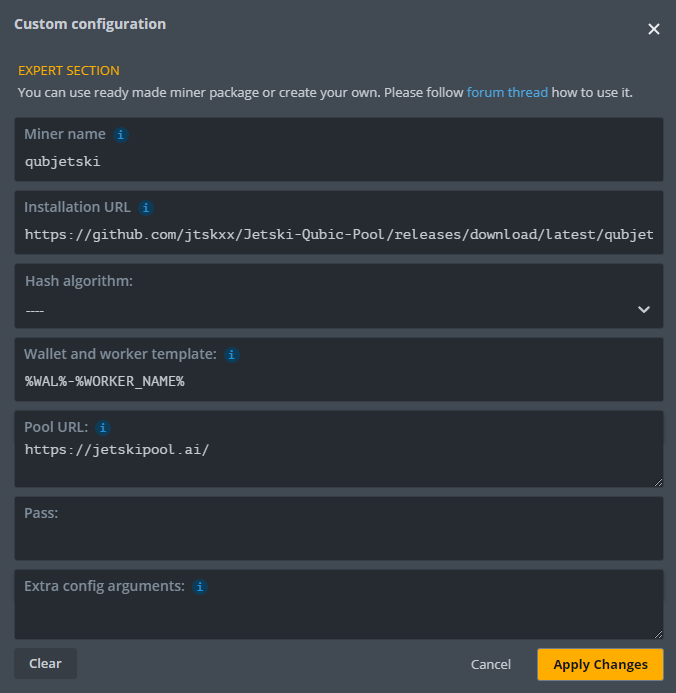
Wallet Configuration
Configure your wallet in HiveOS using the following format:
%WAL%-%WORKER_NAME%- %WAL%- will use the Qubic wallet address that you configured in your HiveOS account
- -%WORKER_NAME% will automatically use your HiveOS rig name without requiring you to replace it manually
Extra Config Arguments
GPU MINING:
(Leave empty for GPU-only mining)CPU MINING:
- "amountOfThreads":0 = All available Threads -1
- Huge Pages: (100 x Number of threads)
"cpuOnly":"yes"
"hugePages":1000GPU + CPU (DUAL MINING):
"amountOfThreads":0
"hugePages":1000LINUX SETUP
-
DOWNLOAD THE LATEST MINER
Download the latest miner qubjetski-Linux-v4.3.tar.gzwget https://github.com/jtskxx/JETSKI-QUBIC-POOL/releases/download/latest/qubjetski-Linux-v4.3.tar.gz -
EXTRACT THE MINER
tar -xvzf qubjetski-Linux-v4.3.tar.gz && cd qubjetski-Linux-v4.3 -
LAUNCH THE MINER
Once extracted, you can start the miner:QUICK STARTRun the miner directly and the setup wizard will guide you step-by-stepADVANCEDFor large deployments, launch with custom flags./qubjetski-Client
Command Line Flags
| FLAG | DESCRIPTION |
|---|---|
| Identity | |
| -wallet | Your wallet address |
| -workername | Set worker name/alias |
| Hardware | |
| -cpu | Enable CPU mining |
| -threads | Set number of CPU threads (0 = auto) |
| -gpu | Enable GPU mining |
| -gpu-version <string> | GPU trainer version: CUDA or AMD |
| -gpu-cards <string> | Per-GPU mask/batch values, e.g. -gpu-cards="-1,-1,-1". Per card: -1 = enabled with auto batch, 0 = disabled |
| Pool | |
| -pplns | Use PPLNS pool (default = SOLO) |
| Other | |
| -start | Start using existing appsettings.json |
| -help | Show available commands |
WINDOWS SETUP
-
DOWNLOAD THE LATEST MINER
DOWNLOAD qubjetski-Windows-v4.3.zip -
EXTRACT & LAUNCH
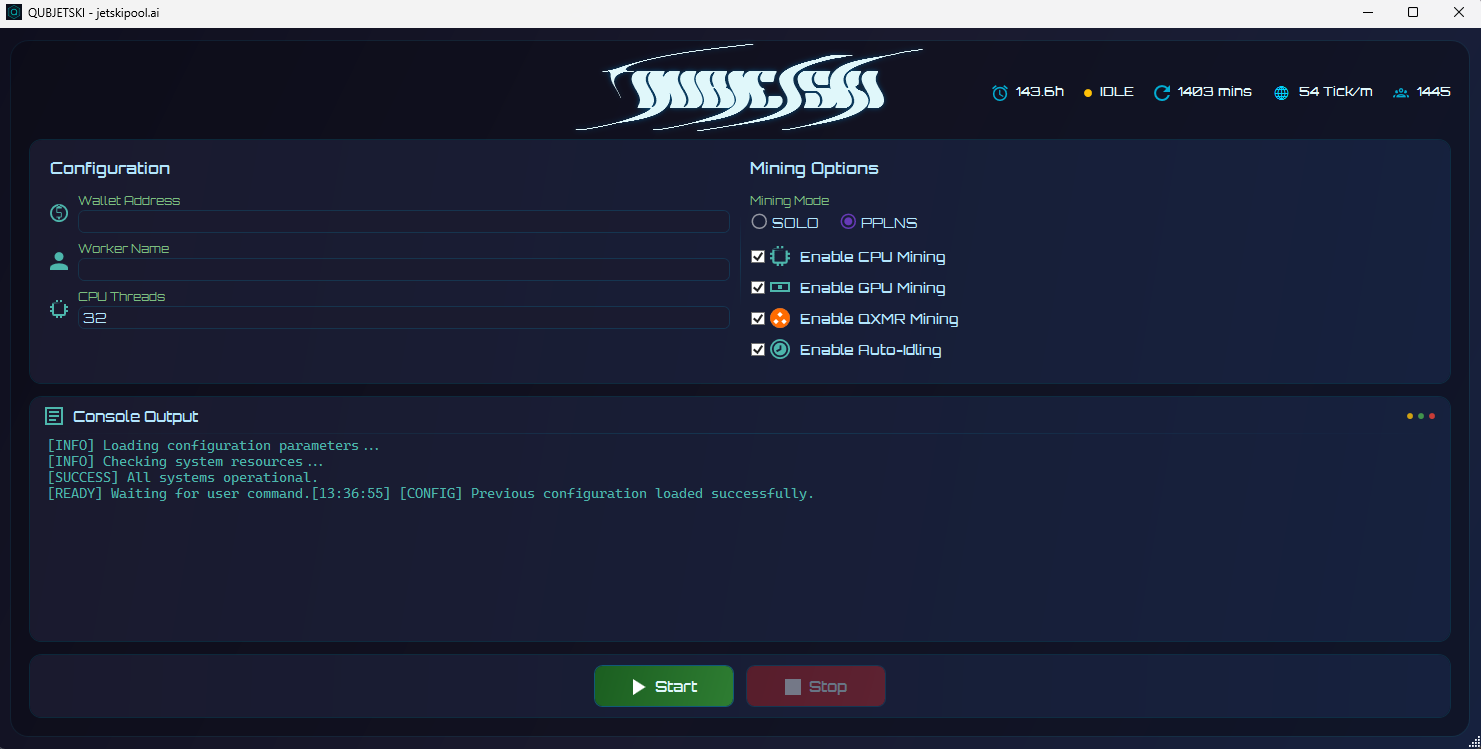
STEP 1Extract the .zip file using Windows unzipper or WinRARSTEP 2Double-click qubjetski-Miner.exeSTEP 3Enter your Wallet Address and Worker Name
Mining Options
CPU-ONLY
Enable: CPU Mining
▸ CPU → AI Training
GPU-ONLY
Enable: GPU Mining
▸ GPU → AI Training
CPU + GPU
Enable: CPU Mining + GPU Mining
▸ CPU + GPU → AI Training
MACOS SETUP
NOTE
Currently only Intel CPUs supported. Apple Silicon (ARM) coming soon.
-
INSTALL DOCKER
STEP 1Open Terminal (Cmd + Space → type "Terminal")STEP 2Paste the command below and press Enter/bin/bash -c "$(curl -fsSL https://raw.githubusercontent.com/Homebrew/install/HEAD/install.sh)" && brew install --cask docker && open -a Docker && while ! docker system info > /dev/null 2>&1; do sleep 1; done -
START MINING
CPU MININGdocker run --rm jetskipool/miner:qubjetski --pplns -w WALLET --cpuGPU MININGdocker run --rm --gpus all jetskipool/miner:qubjetski --pplns -w WALLET --gpuCPU + GPU MININGdocker run --rm --gpus all jetskipool/miner:qubjetski --pplns -w WALLET --cpu --gpu
DOCKER SETUP
A single image, three ways to run it. Ideal for Vast.ai, Salad, and Clore.AI.
CPU
docker run --rm jetskipool/miner:qubjetski --pplns -w WALLET --cpuGPU
docker run --rm --gpus all jetskipool/miner:qubjetski --pplns -w WALLET --gpuCPU + GPU
docker run --rm --gpus all jetskipool/miner:qubjetski --pplns -w WALLET --cpu --gpuOPTIONAL FLAGS:
SOLO MODE
Swap --pplns for --solo
WORKER NAME
Add --workername your-name
CPU THREADS
Set --threads <N> (default: auto)
Command Line Flags
| FLAG | DESCRIPTION |
|---|---|
| Identity | |
| -w, --wallet <address> | Your wallet address |
| --workername <name> | Set worker name/alias |
| Pool | |
| --pplns | Use PPLNS pool |
| --solo | Use solo pool |
| Hardware | |
| --cpu | Enable CPU mining |
| --threads <count> | Set number of CPU threads (omit with --cpu = auto) |
| --gpu | Enable GPU mining |
FREQUENTLY ASKED QUESTIONS
When is the payout made?
AI training rewards follow this timeline:
AI TRAINING REWARDS
These are delayed by one epoch. If you mine from Wednesday to Wednesday (Epoch N), you'll receive your AI training rewards at the end of the following epoch (Epoch N+1) — essentially one week after your mining epoch ends.
The one-week delay for AI Training rewards is built into the Qubic protocol itself — it's how the network pays out to pools and Computors, not a pool-side decision.
How does the Qubic blockchain work?
Qubic uses a tick-based architecture instead of traditional blocks. Each tick occurs roughly every second, and during each tick the network's 676 Computors reach consensus on the current state.
Rather than bundling transactions into blocks and mining them periodically, Qubic validates state continuously — every tick, the Computors execute a small computation task together to confirm and advance the ledger.
This design enables:
- Real-time transaction finality — no waiting for block confirmations
- Native smart contracts — executed directly within the tick cycle
- Decentralized computing — the network can run AI workloads and other computations natively
Think of it as a constantly-running state machine rather than a chain of discrete blocks.
What's a solution?
Qubic's mining trains an AI neural network called Aigarth. Miners generate and evaluate Artificial Neural Networks (ANNs) rather than searching for hash collisions.
How the ANN works
Aigarth uses fully recurrent neural networks with trinary values (-1, 0, +1) for both neurons and synapse weights. This trinary system allows for more nuanced outputs than traditional binary models, including the ability to express uncertainty (0 = "I don't know").
The ANN runs through multiple ticks of simulation where neurons propagate signals to their neighbors. The miner then applies mutations — adjusting synapse weights or inserting new neurons — keeping only changes that improve performance. Redundant neurons are automatically pruned.
If enough output neurons match the expected values, that's a valid solution, which gets verified by the 676 Computors.
The path toward AGI
Aigarth's approach mimics biological evolution. The ANNs created by miners feed into a "Teacher" ANN that modifies and improves them, creating a recursive self-improvement loop.
The goal is to evolve neural architectures that can generalize across tasks rather than being trained for specific ones — the key distinction between narrow AI and AGI. By distributing this evolutionary process across thousands of miners, Aigarth aims to explore a massive search space of possible architectures that centralized approaches couldn't cover.
Why does difficulty/hashrate change so often?
Qubic mining isn't traditional hash-based mining — it involves training complex neural networks that must meet a specific quality threshold to produce a valid solution.
Each epoch, the network sets a new threshold for neural network complexity. Depending on how difficult that threshold is to achieve, the effective network difficulty and global hashrate will shift — sometimes significantly.
This means
- Epoch-to-epoch variation — Some epochs are harder than others based on the AI training parameters
- OC tuning may be needed — What worked last epoch might not be optimal for the current one; tweaking your overclocks can improve results
Unlike traditional PoW where difficulty adjusts predictably based on block times, Qubic's difficulty is tied to AI task complexity — making it more dynamic and variable.
What is an epoch and how long does it last?
An epoch is Qubic's reward cycle. It runs from Wednesday 12:00 UTC to the following Wednesday 12:00 UTC — exactly one week.
During each epoch, miners compete to find solutions for their Computor or pool. At the end of the epoch, rewards are distributed based on the number of solutions found relative to the network's total. Your performance during the epoch determines your share of the weekly emissions.
What's the difference between this pool and others?
We combine innovation, precision, and expertise to redefine cryptocurrency mining.
MAXIMUM PERFORMANCE
Deliver the full potential of your compute power. With precision-driven algorithms and advanced AI, our services ensure optimal performance, unmatched efficiency, and accessibility — for everyone.
TRANSPARENCY FIRST
Trust and transparency are at the core of everything we do. Our dashboard provides in-depth stats about your mining performance, pool activity, and Qubic network data — complete visibility so you always know exactly where you stand.
BUILT FOR THE FUTURE
Our infrastructure is designed to meet the challenges ahead, ensuring reliability, efficiency, and scalability for every miner — whether you're running a single rig or a full operation.
24/7 SUPPORT
Our team is available around the clock on Discord. We believe in fostering trusted relationships with our miners, where integrity is non-negotiable.
What's the difference between PPLNS and Solo mining?
PPLNS
Pay Per Last N Shares
Your rewards are based on your contribution to the pool over a rolling window — on Qubic, that window is one epoch (one week). When the pool finds solutions, the payout is distributed proportionally among all contributing miners. This gives you more consistent, predictable earnings.
SOLO
Independent Mining
You mine independently. You only get rewarded when you find a solution. Higher risk, higher variance — but bigger payouts when you hit. Generally, if you're running 6-10 GPUs or more, Solo becomes a solid option.
We introduced PPLNS when neural network settings became too difficult for some rigs to find solutions reliably on their own — it's a way to still earn rewards even if your hardware struggles with the current algorithm difficulty.
Which one should I choose?
Neural network settings change often, so what works best can vary epoch to epoch. Some weeks Solo might be more profitable, others PPLNS. The best approach: try one week on PPLNS, then one week on Solo, and compare your results.
Our pool is 100% transparent — you can check the public stats to see how many solutions other miners are getting with their hashrate, which can help you decide. Still unsure? Jump into our Discord with your hashrate and hardware details, and we'll help recommend the best mode for your setup.
Why don't I see my worker/rig on the dashboard?
New rigs can take up to 10 minutes to appear on the dashboard. If it's still not showing after that, double-check that your miner is configured with the correct wallet address and worker name.
Does the pool support SSL/TLS connections?
The pool connects via WSS (WebSocket Secure), providing TLS-encrypted communication between your miners and our infrastructure.
Qubic operates on two distinct computation phases — AI neural network training and external computation during idle periods. This requires persistent, low-latency connections to coordinate workload transitions in real time. WSS provides both the encryption layer and the bidirectional communication channel necessary to switch your miners between phases at the optimal moment, ensuring maximum uptime on productive work.
How do I set up multiple rigs under one account?
Use the same wallet address across all your rigs, but assign each one a unique worker name. This allows you to track individual rig performance on the dashboard while consolidating all rewards to a single payout address.
Each rig will appear separately in your stats, making it easy to monitor and troubleshoot.
How do I contact support?
For any questions, technical issues, or setup assistance, head over to our Discord server. Feel free to ping or DM Jetski for anything — support is available 24/7.